
Why CyberNanny: parental control for your child's phone in 2026
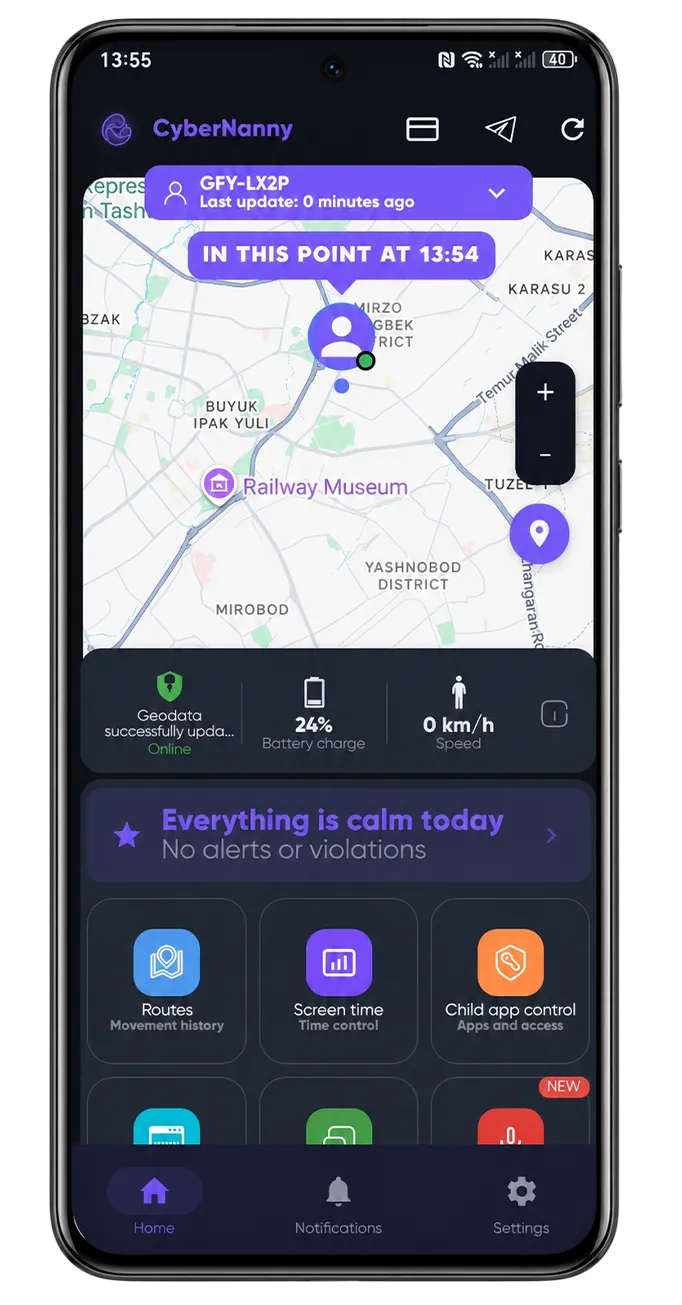
CyberNanny is a parental control app for your child's smartphone. In short: it helps parents see what's happening on their kid's phone — messenger chats, visited sites, installed apps, location — and react to risks in time. Since May 2026, core features are free forever.
This article is for parents who are first considering child safety online and want to understand exactly what CyberNanny does and why it's needed.
What problems does parental control solve
A modern child spends 4-8 hours a day on their smartphone. That's a huge window to the outside world — one parents are often unfamiliar with. Here are real situations where CyberNanny helps:
- Contact with strangers in messengers. Adults pretending to be peers message children on Telegram, WhatsApp, Instagram. CyberNanny shows parents all chats — you can see and stop a dangerous contact before a real-life meeting.
- Bullying in school chats. Kids rarely tell parents they're being bullied. CyberNanny sees messages and detects bullying automatically (AI alerts).
- TikTok, YouTube, and gaming addiction. Unchecked screen time hurts sleep, learning, mental health. CyberNanny sets per-app limits: TikTok 1 hour daily, games 2 hours, then auto-block.
- Dangerous challenges and trends. Teens copy risky TikTok challenges. CyberNanny AI alerts find mentions of dangerous trends in chats and warn parents.
- Subtle behavior changes. Depression, friend problems, substance use — leave traces in messages. We don't suggest reading every message, but AI catches critical signals automatically and notifies the parent.
- Where is the child and when did they come back. Live map shows real-time location. "Home" geofence notifies when child enters/leaves.
- Child uninstalls the app. Teens uninstall apps imposed by parents. CyberNanny has uninstall protection (anti-tamper) and a built-in chat with the parent — kids don't want to uninstall something they use to talk with you.
How CyberNanny works — technical part
For parental control to work, you need 2 devices: the child's phone (with CyberNanny Kids app) and the parent's phone (with CyberNanny Parent). On the child's device, the app collects data via Android/iOS system APIs:
- Installation on child's device. Download CyberNanny from Google Play, App Store or AppGallery, grant accessibility (for messenger monitoring), location (for the map), and notifications permissions.
- Pairing to parent account. Open CyberNanny on your phone → scan QR code or enter pairing code. The child's device appears in your cabinet.
- Configuring limits and filters. In the parent cabinet, set daily screen time limit, block specific apps, configure "school time" when social media is closed, add "home" geofence.
- Receiving data. From the child's device come messenger chats (Telegram, WhatsApp, Viber, Instagram, Facebook, VK, MAX, Signal), browser history (29 supported browsers), app list and usage time, location.
- Notifications and alerts. Parent gets a push when geofence triggers, limit ends, new contact appears, or AI detects risky content.
What you get on day one
After pairing the child's device, you immediately get 7 days of full PRO access — trial period. During this time you can try all features (including unlimited AI Advisor and detailed AI alerts). After 7 days you automatically move to the free plan — no charges without your consent.
Free forever:
- Full access to all your child's messenger chats
- Browser history (29 browsers)
- App limits (TikTok, YouTube, games) with auto-block
- Anti-uninstall protection
- Built-in parent-child chat (text, voice, photos, videos)
- Live map and "home" geofence with push notifications
- Calls and contacts
- 1 child device
- AI Advisor: 1 query per month
- AI alerts: first alert of the month with full details, others masked
Who CyberNanny is for
CyberNanny is made for parents of children aged 6-17 who want to understand what's happening with their child online but don't want to become a "phone supervisor." We stand for an open format — the child knows the parent sees the chats, you can calmly discuss the rules, and then control stops being a conflict.
Most often chosen by:
- Families where a child is getting their first smartphone — set rules from the start
- Families where a teen has "gone into the phone" — need limits and visibility
- Single parents and working parents — need to know where the child is
- Families after an incident (stranger contact, cyberbullying, risky apps) — need safety net
Child data security
- All data transferred over HTTPS with encryption
- Cabinet access — only for the parent (login/password + 2FA)
- Servers — in RU and UZ, data doesn't leave these jurisdictions
- Message contents never shared with third parties or used for AI training
- Full compliance with 152-FZ (RF) and GDPR-equivalents in UZ/UK
How to start
Registration takes 5 minutes:
- Download CyberNanny from Google Play, App Store, or AppGallery
- Create a parent account (email + password)
- Give your child a phone with the same app (in "I'm a child" mode) — scan QR
- Open the parent cabinet and verify — data is flowing
Questions? Write to @cybernanny_support or supports@thecybernanny.com. We reply within an hour during business hours.
Частые вопросы
What is CyberNanny and why do I need it?
CyberNanny is a parental control app for Android and iOS. It helps parents track child activity on a smartphone: messenger chats, browsing history, installed apps, location. The main goal — child safety online without total surveillance.
How much does CyberNanny cost?
Since 2026, core features are free forever: messengers, browser history, app limits, anti-uninstall, parent-child chat, live map. PRO subscription is only for unlimited AI Advisor and unmasked AI alerts.
What age range is it for?
Suitable for children 6-17. For younger kids (6-10) the focus is on live map and contacts. For teens (11-17) — messengers, AI alerts for risky content, social media limits.
Will my child know they're being monitored?
Depends on settings. By default the app is visible to the child — parents openly agree on the rules. Hidden mode exists but breaks trust. We recommend an open format + chat for communication.
How is CyberNanny different from other parental control apps?
Main differences: (1) free model — core features free forever; (2) AI Advisor answers any parenting questions; (3) AI alerts find bullying and strangers automatically; (4) built-in chat that kids won't uninstall.